StretchSense XR Reality Glove (Pair)

StretchSense XR Reality Glove (Pair)

Large
$495.00 USD
Sale price  $495.00 USD Regular price 
Skip to product information
StretchSense XR Reality Glove (Pair)
1/8

StretchSense XR Reality Glove (Pair)

$495.00 USD
Sale price  $495.00 USD Regular price 
Glove Size
32stretch sensors
Hapticsfeel your games
20hbattery, no haptics
5mwireless range
Bluetoothstraight to your PC
Washablecold machine wash

Made for how you play

One pair of gloves,
three ways to use them.

Player in a VR headset reaching out with a gloved hand

Play SteamVR games with your hands, not a controller.

  • Gestures map to Valve Index controller inputs in compatible games
  • Move with the virtual joystick: thumb gesture to walk, look to steer
  • Optional haptics for feedback

Works with
SteamVRGames supporting Valve Index controllers

VTuber showing hand gestures

Real hand movement for your avatar, on stream and in videos.

  • Send finger data to VMC avatar apps such as Warudo
  • Run VMC and SteamVR at the same time
  • Expressive gestures viewers can read: count, point and react

Works with
VMC avatar appsWarudoSteamVR

See it in action

Watch the Reality XR Gloves in play.

See expressive finger tracking and gesture control in a real session.

Gesture controls

Record any gesture.
Make it any button.

Hold a hand shape, record it in the XR Game Companion app, then assign it to a Valve Index controller input. Start with a ready-made control set or make your own.

Set different gestures for different games and change them any time.

Fist gestureFistGrip + Trigger
Finger gun gestureFinger gunGrip
Point gesturePointGrip
Pinch gesturePinchA button, for example
Two-finger gestureTwo fingersB button, for example
+   Your own gesture → Any button

Getting started

Up and running
in four steps.

01 / GEAR UP
Person pulling on a glove

Put on your gloves.

Clip in the StretchSense pucks and attach your trackers. Hold the puck button until the light blinks blue.

02 / CONNECT
Close-up of the StretchSense puck

Choose your setup.

In the XR Game Companion app, pick SteamVR or OpenXR. For VTubing, turn on VMC too.

03 / CALIBRATE
Gloved hand raised with fingers extended

Fit the hand model.

Calibrate both hands together. Fit a ready-made hand model or train your own for a closer match.

04 / PLAY
Person playing in VR with a gloved hand

Set controls and go.

Choose a ready-made control set or record your own gestures, then launch your game or stream.

Before you buy

What you’ll need.

The gloves track your fingers. Trackers track where your hands are.

Gloves fitted with trackers for hand position

⌖  Trackers for hand position

These fit the mount that comes with each glove:

Tundra TrackerHTC Vive Tracker 3.0PICO Motion Tracker

▣  A VR-ready PC

Run SteamVR or an OpenXR app for games and VRChat. For VTubing, use a VMC avatar app such as Warudo.

⌁  Bluetooth 5.0 or newer

Most PCs have it built in. If yours doesn’t, add a Bluetooth 5.0 USB adapter.

StretchSense XR Reality Game Gloves pair

In the box

Everything to get started.

♧2 sensor gloves, left and right
◇2 StretchSense pucks
⌖2 tracker mounts and adapters
ϟMagnetic charger and USB-A to C cable
▢Carrying case
▱Wash bag
▦Start guide with app download

Specifications

The details.

Sensors32 stretch sensors
HapticsHaptic feedback from your games, sent back to the gloves
Finger trackingTrain your own hand-tracking model, or calibrate a ready-made one.
Per-finger splayExperimental; full version coming soon
Hand positionNeeds trackers (sold separately)
ControlsValve Index controller emulation. Record any gesture as any button. Virtual joystick and optional haptics.
OutputSteamVR or OpenXR, plus VMC at the same time
SoftwareXR Game Companion app
ConnectionBluetooth 5.0 or newer: your PC’s built-in Bluetooth, or a USB adapter
ElectronicsTwo sensor gloves and two detachable StretchSense pucks
RangeUp to 5m
BatteryUp to 20h without haptics
ChargingMagnetic charger, USB-A to USB-C cable
CareMachine wash cold in the wash bag, pucks removed. Line dry.
Warranty1-year hardware warranty

Compare

Which glove is right for you?

This product

XR Reality Game

For gamers, VTubers and streamers.

  • SteamVR with Valve Index controller emulation
  • OpenXR hand-tracking layer
  • VMC streaming for avatar apps
  • Gesture controls and virtual joystick
Buy · $495

For teams

XR Reality Train

For companies building XR training.

  • Same Reality Glove hardware
  • StretchSense API and OpenXR for building custom apps
  • PCVR headsets; standalone headsets coming soon
Learn more

Coming from the Studio Glove?

How the Reality glove compares to our previous Studio Glove, which is no longer sold.

STUDIO GLOVEREALITY XR GAME
16 stretch sensors32 stretch sensors
No hapticsRumble haptics
Up to 12h batteryUp to 20h battery (without haptics)
Dedicated dongleBluetooth, straight to your PC
One splay setting for all fingersPer-finger splay · experimental

Good to know

Questions, answered.

What size should I get?

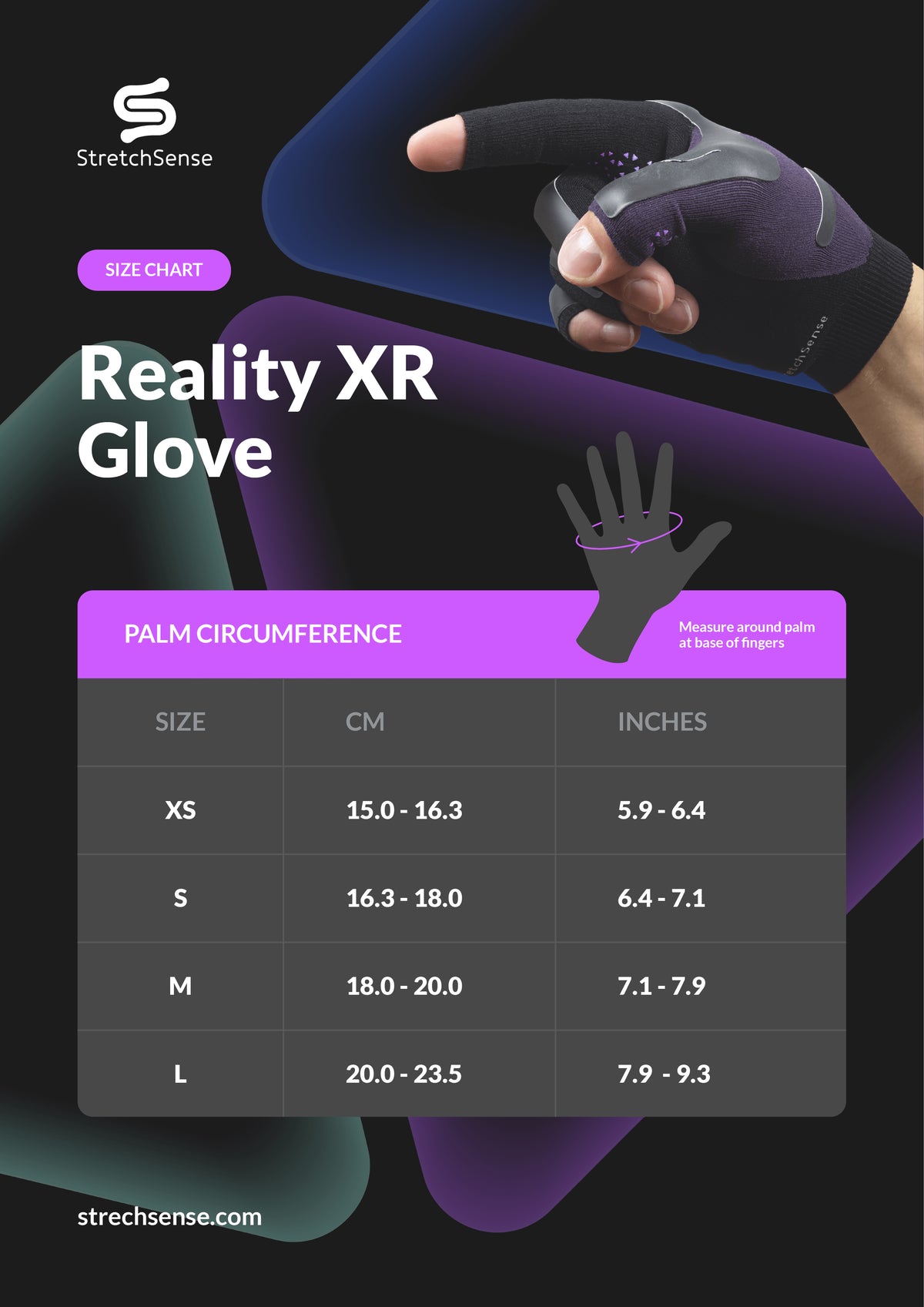
A snug fit keeps the sensors moving with your fingers for better tracking. The knit stretches a little with use. See the size guide.

Are import duties and taxes included?

No. The recipient pays local taxes, customs duties and tariffs. The product page notes the current US import tax estimate; check the latest details before ordering.

When will my order ship?

Shipping options and availability for your country are shown at checkout.

What software do I need?

Use the XR Game Companion app to pair the gloves, train or calibrate your hand model, record gestures and send data to SteamVR or OpenXR, plus VMC.

How do I move around in games?

Use the virtual joystick. D-pad mode is quickest to calibrate; scalar mode offers finer control and takes longer to set up.

How do I wash the gloves?

Remove the pucks, put the gloves in the wash bag and wash on a cold delicates cycle. Line dry. Don’t tumble dry, wring or iron; make sure they’re fully dry before reattaching the pucks.

XR Reality Game Gloves · $495 USD per pair

Bring your hands
into the game.

Choose your size and add a new layer of expression to SteamVR, VRChat and your streams.

CHOOSE YOUR SIZE   →

Import duties and local taxes not included.